Db · Pro module
Database
The database decides the answer as much as the input does. Look inside one, and put several side by side over the system you actually care about.
Included in GibbsStudio Professional and Enterprise.
What Database does
- Hierarchical views
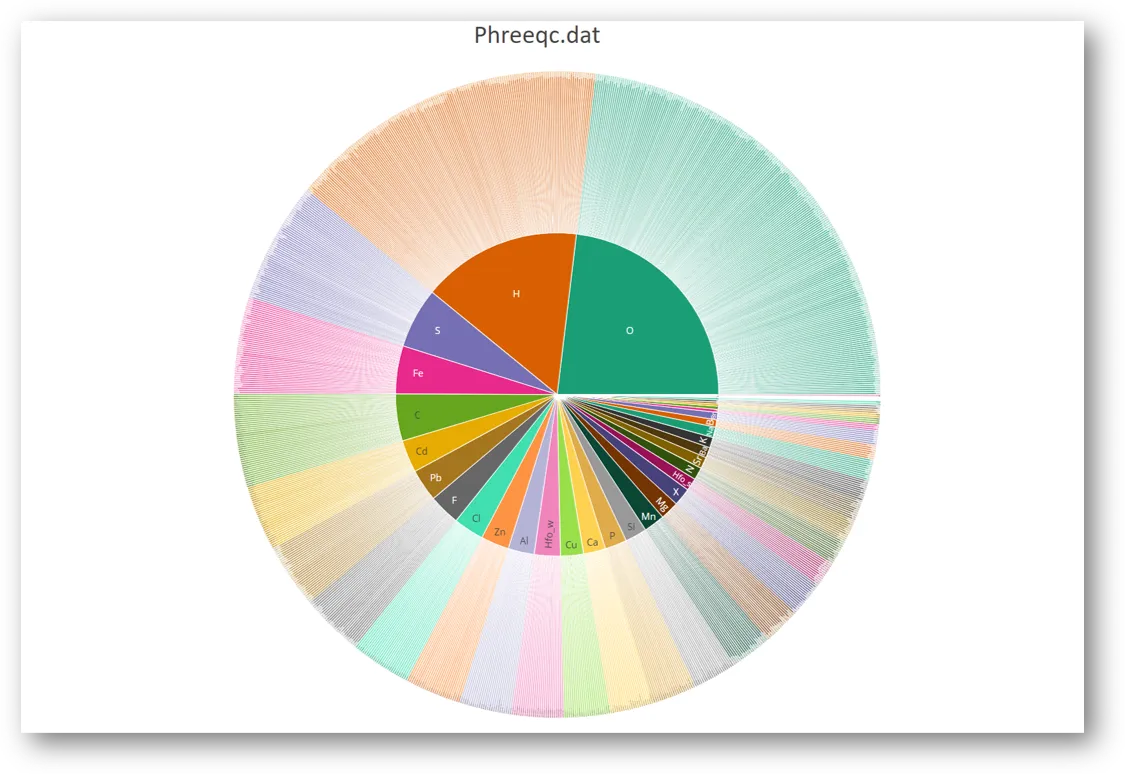
- Sunburst, treemap and icicle plots of the elements, valence states, species and phases in a PHREEQC database — how to answer "does this database have what I need?" without reading a 5 MB text file.
- Compare over a system you name
- Give the comparison several databases and the elements involved — Ca, C, Fe(3) — and it reports what each database has and lacks for that system, and the species and phases per element and valence state.
- Where the numbers disagree
- Where the same reaction is written alike in two databases, the comparison shows how far apart their log K values are, and plots log K against temperature. The size of the disagreement, before you meet it as a discrepancy between two projects.
- Databases travel with the project
- A database is stored inside the project, not referenced from disk, so a project you send someone carries the thermodynamics it was run against.
Typical uses
- Choosing a database for a new project
- Explaining why two projects disagree about the same water
- Auditing custom database additions
- Teaching how a thermodynamic database is structured
Other modules
01CommunityAkvaIon balance, water types, irrigation indices and the three diagrams02CommunityPhreeqcInputs, databases, selected output and parametric runs03ProPredominancePredominance, Pourbaix and mineral stability diagrams04ProStatisticsMonte Carlo uncertainty, reproducible sampling and PCA05ProOptimizationFit kinetics, isotherms and titrations to lab data
Bring your existing PHREEQC models
Inputs and databases import as they are. PHREEQC is bundled, so you can start in minutes.